Understand configurators
3D configurator
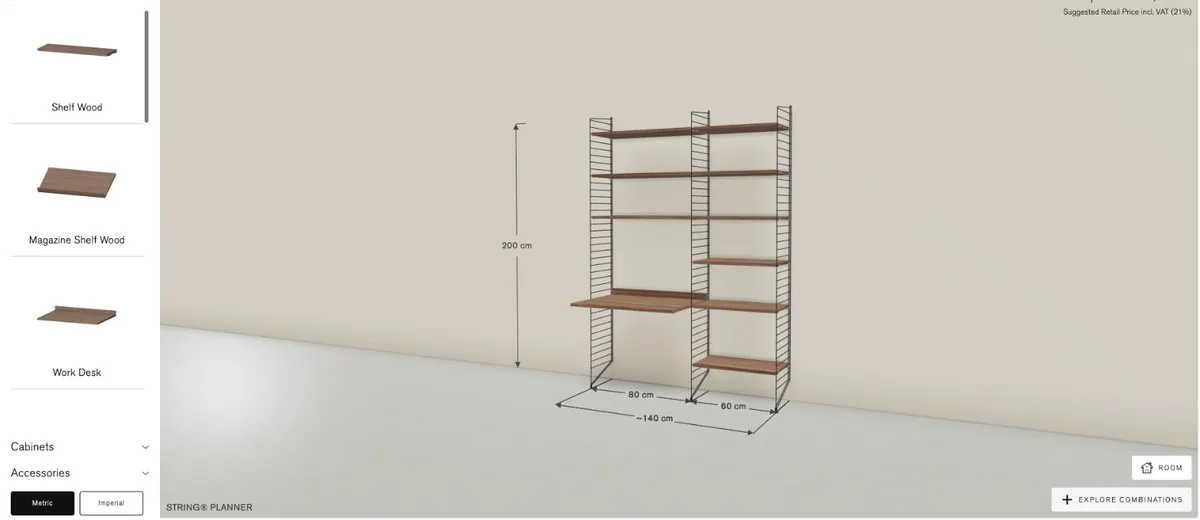
A 3D configurator shows the customer’s choices in a model that can be rotated and zoomed. It adds the most value when appearance, fit or assembly decides the purchase.
In short
- Shows the product as it will be, in real time, when the customer changes choices.
- Makes the biggest difference when the customer needs to see the result to dare to order.
- Costs more than images, mainly in 3D models and their maintenance.
Contents
What is a 3D configurator?
A 3D configurator is a product or sales configurator where the result is shown as a 3D model in the browser. When the customer changes material, dimensions or options, the model changes instantly. Behind it are the same rules as in a configurator without 3D, but each choice also needs a visual representation.
When does 3D make a difference?
- Appearance is a large part of the purchase, as with furniture, interiors and vehicles.
- The product is assembled from modules, and the customer needs to see the whole.
- Dimensions and proportions are hard to understand from a drawing.
- Wrong choices are costly to correct, and a clear image reduces the risk of misunderstandings.
When are images or 2D enough?
If the choices are not visible, such as output, software or certifications, 3D adds little. If the products are few, photographed variants can be both cheaper and better-looking. And if the customer buys on specification rather than appearance, a clear table is often better than a model.
What does it take to succeed?
3D models
Every part and material needs to be modelled and optimised for the web. CAD is often a good starting point, but the files need to be simplified to load quickly. Decide who creates models for new products after launch.
Performance
The configurator should work on ordinary phones, not just on a fast computer. Ask about loading times and how the model behaves on a weak connection.
The same rules as without 3D
3D does not solve the rules. A good-looking model that allows choices that cannot be delivered does more harm than good. The logic needs to be in place first.
Questions to ask the supplier
- How are the 3D models created, and can we use our CAD?
- What does it cost to add a new product or a new material?
- How fast does the configurator load on an ordinary phone?
- Can the images from the configurator be used in the online shop, quotes and marketing?
- Who owns the models if we change supplier?
New to the topic? Start with what a configurator is and which types there are, or look up the terms in the glossary.
Frequently asked questions
Does 3D increase sales?
It depends on the product and how the configurator is used. Ask the supplier for measurable results from similar products, and set up measurement from the start so you can follow the effect yourselves.
Do 3D configurators work on mobile?
Yes, if the models are optimised. Test on the devices your customers actually use.
Can we show the product in the customer’s room?
Yes, with AR on mobile or with a spatial configurator where the customer plans in a room.
Do we need 3D models of all products before we start?
No. Many start with the products that sell the most or are hardest to explain with images, and expand the range over time. Existing CAD data can often be used as a basis, but the models need to be simplified to work in the browser and on mobile. Also plan for who creates and updates the models when the range changes, otherwise the 3D configurator quickly becomes outdated.
Does a 3D configurator work on mobile?
Yes, if the models are optimised and the interface is built for small screens. Test on older phones and slow connections, not just on the developers’ computers.
Sources and further reading
- WebGL (Khronos Group)
- glTF, the format for 3D on the web (Khronos Group)
- Augmented reality (Wikipedia)