In short
- A configurator for e-commerce can be built as an add-on in the platform, as an app or as a separate tool that puts the result in the cart.
- What decides is how the choices become an order line: as existing variants, as properties on the line or as a new item.
- The platform’s limits on variants and prices often drive the choice more than the 3D view itself.
Contents
Three ways to add a configurator to e-commerce
1. Add-on or app in the platform
For Shopify, WooCommerce and other common platforms, there are ready-made add-ons for product options, often with images per choice and sometimes with 3D. They are quick to get started with and fit when the choices are few and the price is calculated simply, for example a base price plus surcharges.
The limitation comes when the rules become many, when parts depend on each other or when the same rules need to be used in more channels than the online shop.
2. A separate tool that puts the result in the cart
The configurator is built as a separate interface, often with 3D, and communicates with the e-commerce platform when the customer is done. The platform handles cart, payment and order, and the configurator handles choices, rules and display. That is how several of the examples on this site work, including String and Oscar Jacobson which is connected to Centra.
3. The configurator as its own flow with a quote instead of a purchase
For large or complex purchases, it is not certain that the customer should pay right away. The configuration then ends with a quote request, a booked meeting or a parts list that the salesperson takes further. E-commerce is then only used for what can be bought directly.
How the choices become an order line
This is the most important question in a configurator for e-commerce, and the one most often underestimated. There are three main routes:
| Model | How it works | Fits when |
|---|---|---|
| Existing variants | Each combination exists as a variant with its own item number. | The combinations are relatively few and are in stock. |
| Properties on the order line | A base product with the choices stored as properties, and the price calculated by the configurator. | The product is made to order and the combinations are many. |
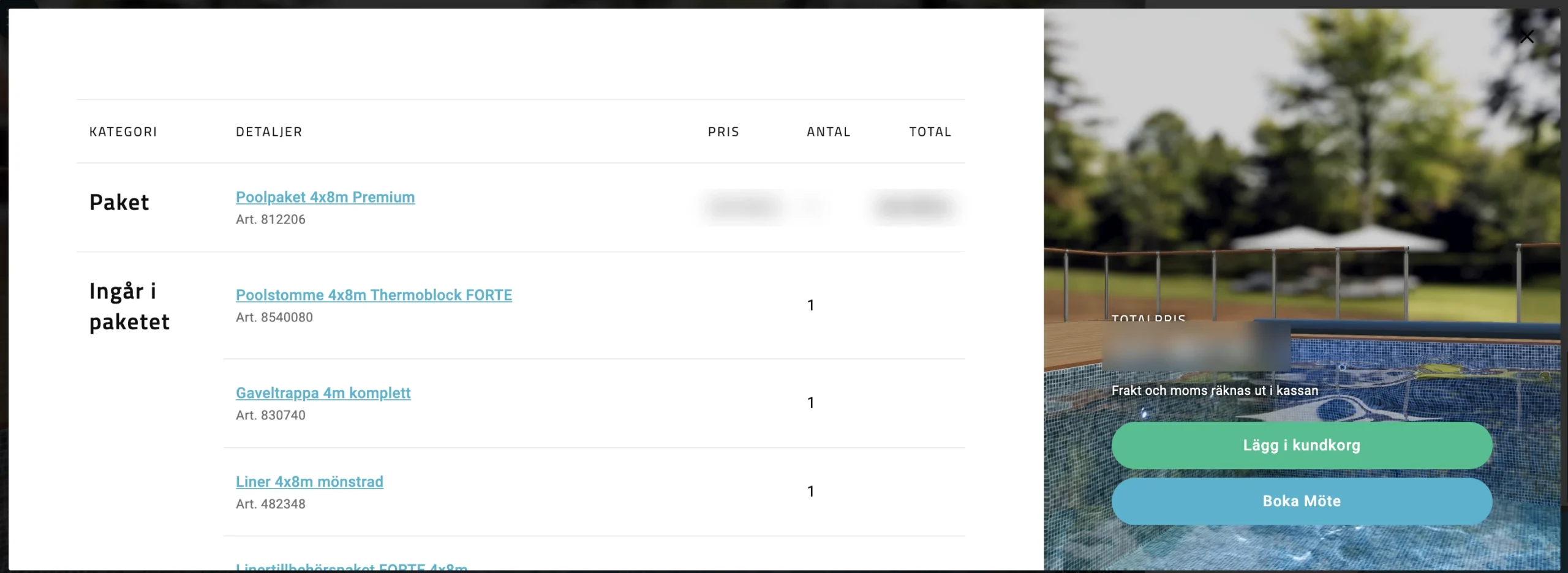
| Parts list | The configuration becomes several items added to the cart at the same time. | The customer builds something from parts, such as a shelf or a pool. |
The platforms’ limits
All platforms have limits on how many variants and options a product can have. In Shopify, since October 2025 a product can have up to 2,048 variants, but still at most three options, for example colour, size and material. In WooCommerce there is no fixed limit, but products with many variants load the choices dynamically and can become slow to administer.
The limits change over time, so always check what applies to your platform and your plan. The important thing is the principle: if the combinations outnumber what the platform handles as variants, the choices need to be stored in another way.
What to decide first
- Where the rules should live: in the platform, in the configurator or in a PIM or ERP system.
- Who calculates the price, and how discounts and campaigns take effect.
- What the order looks like for the warehouse or factory.
- Whether the same configurator should be used by dealers or in stores.
Frequently asked questions
Does a configurator work with Shopify?
Yes. Either with an app from the Shopify App Store or with a custom configurator that puts the result in the cart via Shopify’s interface. The choice depends on how many choices and rules you have.
Does a configurator work with WooCommerce?
Yes, in the same way: with add-ons for simpler cases or with a custom configurator that creates order lines with the choices stored as properties.
Do we have to change e-commerce platform?
Rarely. The usual approach is to connect the configurator to the platform you already have.
Sources and further reading
- Shopify: The product variant limit is now 2048 for all merchants
- WooCommerce: Change limit on number of variations for dynamic variable product dropdowns